How to Find Vehicle Owners name by Registration No....???
Send An SMS to 7738299899 in the following format...
VAHAN AS 13 AA 1234
AS means Assams.....you type your Registration no which you want to Find.....
Example AS 13 D 1502 to 7738299899.....
Please subscribe my official youtube channel for video updates.....
Hack and Tricks
and like my facebook page.....
Hack and Tricks facebook
and you can make me your friend on facebook.... ;-)
Facebook Shahrukh Rdx
VAHAN AS 13 AA 1234
AS means Assams.....you type your Registration no which you want to Find.....
Example AS 13 D 1502 to 7738299899.....
Please subscribe my official youtube channel for video updates.....
Hack and Tricks
and like my facebook page.....
Hack and Tricks facebook
and you can make me your friend on facebook.... ;-)
Facebook Shahrukh Rdx
How to Backup Contacts & SMS to SD Card in Windows?
- Download and Install the contacts+message backup app from the Store. Store link and QR can be found at the end of this post.
- When installed, go to Settings and scroll to the end of the list and selectcontacts+message backup.
- Tap on agree to accept the license terms.
- Tap on backup, select the items to backup viz contacts, SMS and MMS and finally tap on backup again to start the backup process.
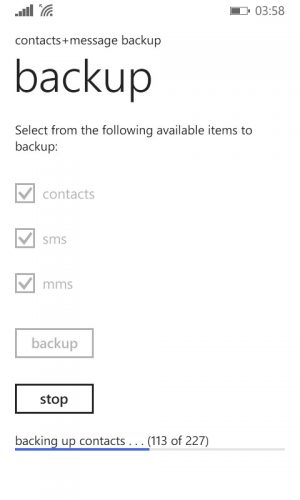
- The backup process will start and the progress can be seen towards the bottom of the screen.
The backups are saved to the backup+restore folder on the SD card. Contacts are stored as a single vcf file while SMS are stored as a xml file.
Restoring Backed up Contacts, SMS and MMS
You can restore the backups to the same Windows Phone device on which the backup was made or on any other Windows Phone device which supports an SD Card. Here’s how to do that.
- Install the contacts+message backup app if not already installed.
- Insert the SD card or Transfer the backup+restore folder to the SD card of the Windows Phone on which the contents are to be restored.
- Go to Settings> contacts+message backup and choose restore.
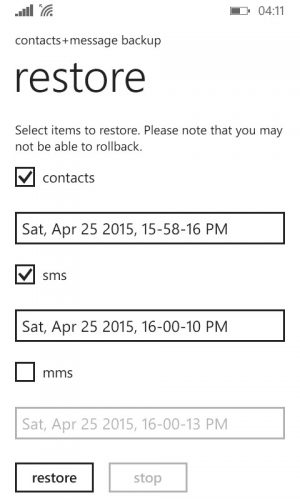
- Tick the items to restore and then select the restoration point that should be used for restoring the contents (if there are more than 1 backups stored to the SD card).
- Tap on restore to begin the restoration process.
How to Install Cracked/Patched XAP on Windows Phone?
- Firstly, make sure that you have a developer unlocked Windows Phone (7/8/8.1) device. If you don’t, follow this tutorial to unlock your phone. It’s free.
- Download the Windows Phone Mini SDK or the Full SDK as needed (download links in the above tutorial). However, if you have a developer unlocked phone, chances are that you already have it installed on your PC; so skip.
- Connect your Windows Phone Device to your PC using a Data Cable.
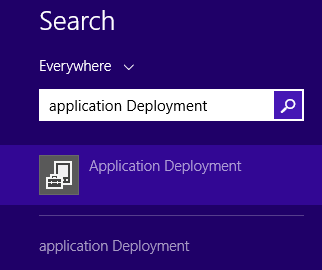
- Click on Start and type Application Deployment. Then launch theApplication Deployment app.
- Set Target to Device.
- Click on Browse in front of the XAP field and locate your downloaded (cracked) or self-packed XAP file.
- Make sure your device’s screen is unlocked. Then click on Deploy at the bottom right of the window.
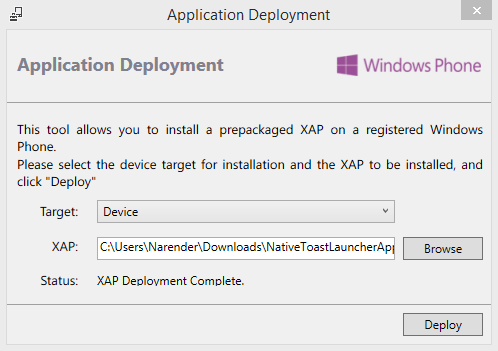
- After a few seconds, the application will show a XAP Deployment Completestatus.
- The app has been deployed. You can now disconnect your phone and start using the deployed app.
How can we play piano on PC?
Just simple download any piano for your pc and play.
electronic piano is best because this is less than 1MB (430KB) but have 127 sound effect
Downlod from the given below link.... click on download.
DOWNLOAD

electronic piano is best because this is less than 1MB (430KB) but have 127 sound effect
Downlod from the given below link.... click on download.
DOWNLOAD
How to repair Damaged or Corrupted SD card???
If you have a corrupt or damaged memory which you tried to format and it keeps replying you with WINDOWS CAN’T FORMAT DISK and you wish to repair it, kindly follow the following steps:-
Insert the corrupted memory card into a card reader, and then connect the card reader to the computer.
Open RUN on your computer (to open RUN click on the “start” icon and enter “search for program” then type in RUN.
After opening RUN type in “CMD” in the provided text box.
After that, type in “DISKPART”.
Type in “LIST DISK”.
Type in “SELECT DISK 1”.
Type in “CLEAN”.
Type in “CREATE PARTITION PRIMARY”.
Type in “ACTIVE”.
Type in “SELECT PARTITION 1”.
Lastly type in “FORMAT FS=FAT32”.
NOTE: YOU SHOULD WAIT FOR 30 MINUTES FOR IT TO FINISH LOADING 1 -100%
After finishing this process remove your card reader from the computer USB port and also remove the SD card from the card reader……..that’s all...
Insert the corrupted memory card into a card reader, and then connect the card reader to the computer.
Open RUN on your computer (to open RUN click on the “start” icon and enter “search for program” then type in RUN.
After opening RUN type in “CMD” in the provided text box.
After that, type in “DISKPART”.
Type in “LIST DISK”.
Type in “SELECT DISK 1”.
Type in “CLEAN”.
Type in “CREATE PARTITION PRIMARY”.
Type in “ACTIVE”.
Type in “SELECT PARTITION 1”.
Lastly type in “FORMAT FS=FAT32”.
NOTE: YOU SHOULD WAIT FOR 30 MINUTES FOR IT TO FINISH LOADING 1 -100%
After finishing this process remove your card reader from the computer USB port and also remove the SD card from the card reader……..that’s all...
Photo of Admin